The calculator below provides an estimate of arrears if the 8th CPC salary revision is applied retrospectively.
8th CPC Arrears Calculator
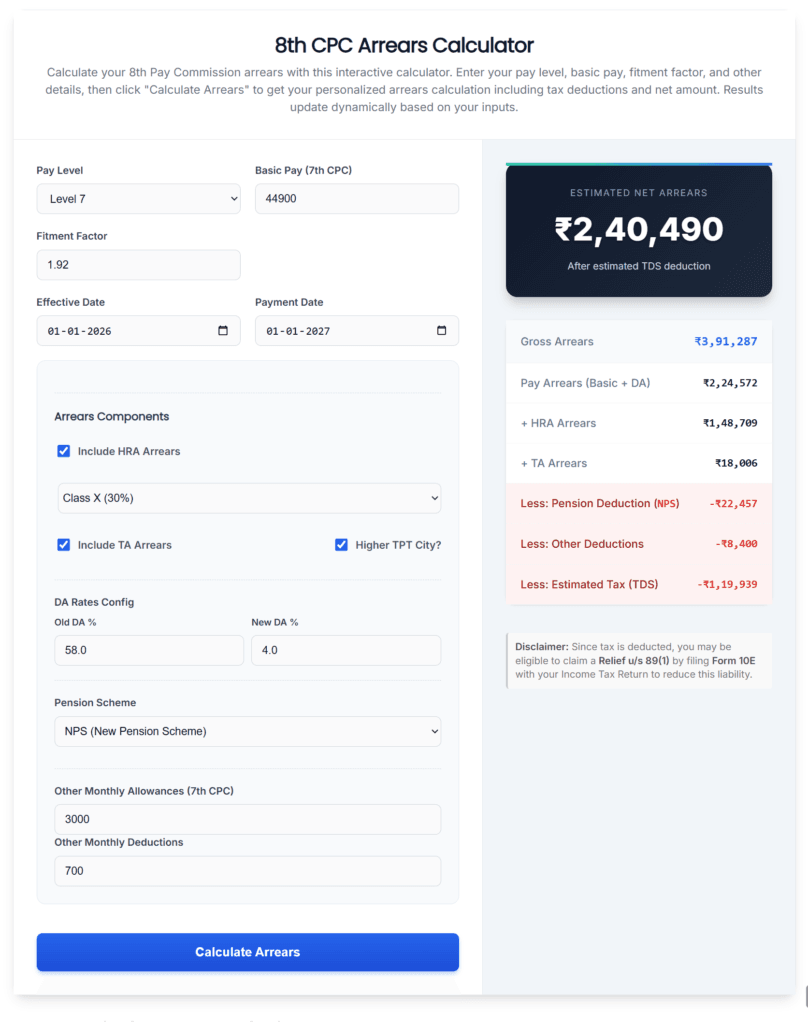
Calculate your 8th Pay Commission arrears with this interactive calculator. Enter your pay level, basic pay, fitment factor, and other details, then click "Calculate Arrears" to get your personalized arrears calculation including tax deductions and net amount. Results update dynamically based on your inputs.
Disclaimer: Since tax is deducted, you may be eligible to claim a Relief u/s 89(1) by filing Form 10E with your Income Tax Return to reduce this liability.
How to calculate expected 8th CPC arrears.
Central Government employees have this question in their mind: how much arrears can I get if the 8th CPC implementation happens late? That is exactly what our 8th pay commission arrears calculator helps you estimate. It works for all pay levels. It also considers the key factors that affect arrears payouts, such as DA changes for the selected year, and effect of NPS & TDS deductions on arrears payout.
We also offer a comprehensive all-in-one 8th Pay Commission salary calculator. That tool focuses on salary calculation and helps you estimate your expected in-hand salary, with a detailed breakdown of the projected increase. However, the calculator on this page is different. This one focuses specifically on arrears under different implementation scenarios. Now, let’s see how to use it step-by-step.
What are 8th CPC arrears?
Arrears refer to the extra amount you receive when the Government revises pay from an earlier date but credits the revised salary later.
For example, if the effective date is 01-01-2026 but the revised pay is credited only from 01-01-2027, employees receive arrears for the months in between. In other words, arrears cover the difference between what you were actually paid and what you should have received after the pay revision.
Details you need before using the calculator.
Before you start, keep these details ready:
- Your Pay Level Your current Basic Pay (7th CPC).
- Expected Fitment Factor.
- Expected Effective Date & Payment Date.
- Old DA % and expected new DA %.
- Pension option (UPS/NPS).
- Other monthly allowances and deductions.
- Whether you want to include HRA arrears and TA arrears (you can toggle these in the calculator to compare results).
Once you have these values, you can calculate arrears in less than a minute.
How to use the arrears calculator (step-by-step)
Step 1: Enter your Basic Pay or select the Level
First, choose your current Pay Level from the dropdown. For example, select Level 6, Level 7, or Level 10. This step matters because your pay level decides the correct pay structure. Once you select the pay level, the calculator automatically displays a basic pay value. However, if your actual basic pay is different, you should edit it and enter the correct amount. Check your salary slip for the exact basic pay.
Step 2: Choose a Fitment Factor
Next, enter the fitment factor you want to test. For example, you can try values like 1.98, 2.0, 2.25, 2.5, 2.75, and so on. Since the final fitment factor is not confirmed yet, we currently expect it to be around 2.0. However, you can also use our fitment factor calculator to choose a more realistic value and compare different scenarios.
Step 4: Choose Effective Date and Payment Date
Now select the Effective Date (when arrears start) and the Payment Date (when the revised pay is expected to be credited).
Example:
Effective Date: 01-01-2026
Payment Date: 01-01-2027
The calculator automatically calculates the arrears period between these two dates, so you don’t need to count the months manually.
Step 4: Select arrears components (HRA and TA)
This step is optional, but it helps you test if you belive the government will pay HRA and TA arrers for 8th CPC. Under Arrears Components, you can include: Include HRA arrears (optional) Tick “Include HRA Arrears”, then select your HRA category: Class X (30%) Class Y (20%) Class Z (10%). Also if you want, tick “Include TA Arrears”. If applicable, also enable “Higher TPT City”.
You can turn HRA and TA ON/OFF and press the Calculate button to see the their effect on your arrears amount.
Step 5: Set DA assumptions (Old DA vs New DA)
Here you will see two fields, Old DA % & New DA %. Enter Old DA % as the DA you actually received under the 7th CPC for the selected period (example: 58% on 01-01-2026). Enter New DA % as the expected DA under the 8th CPC. If the 8th CPC becomes effective from 01-01-2026, DA usually resets to 0% at the start because the old DA gets merged into the revised basic pay. DA may start only in the next 6-month cycle (for example, from July 2026).
Since DA stays 0% for the first 6 months and applies only for the next 6 months, you can use an average New DA (for example, 1.5% to 2%) to keep the calculation simple and reasonably accurate.
Step 6: Choose pension option (NPS/UPS).
Next, choose your pension scheme. If you select NPS or UPS, the calculator subtracts the pension deduction from arrears at the time of credit. This gives you a more realistic net arrears estimate. This selection can also affect TDS, since pension deductions may impact your taxable income.
Step 7: Add other allowances and deductions (optional).
First, add all your fixed monthly allowances together and enter the total amount here. For example: ₹3,000. Next, enter your other monthly deductions such as CGHS, professional tax, EMI recoveries, or any regular deductions. For example: ₹700.
This step is optional. In most cases, these allowances may not be included in arrears. However, they can still affect your taxable income and TDS, so entering them can make the final estimate closer to the actual credited amount.
Step 8: Click “Calculate Arrears.”
Finally, click the “Calculate Arrears” button to get the results. In the results area, you will see Pay Arrears (Basic + DA), HRA/TA arrears (if selected), and Gross Arrears (total before deductions). The calculator also shows deductions such as NPS contribution and the estimated TDS based on the arrears credited. The Estimated Net Arrears is the amount you may actually receive after NPS and TDS deductions, so use that amount for planning.
TDS and Tax Relief on Arrears (Section 89(1) + Form 10E)
Arrears can increase your taxable income in the year you receive it. That’s why our 8th pay commission arrears calculator also estimates the TDS impact on your arrears payout. In many cases, you can reduce the tax burden by claiming a Relief under Section 89(1) of the income tax act. But to claim this relief, you must file Form 10E (if eligible). The calculator automatically displays a tax note near the results when your arrears amount impacts your tax liability.
Conclusion
The expectation of 8th CPC arrears mainly comes from the 7th CPC timeline. Government approved the 7th CPC in June 2016, but made it effective from 01-01-2016. Because of this, Central Government employees received arrears for the months between the effective date and the actual rollout, and the arrears were paid in one installment along with the salary for August 2016 (credited by many departments by 31 August 2016).
In the case of the 8th CPC, the Commission’s report still needs to be submitted and approved. Therefore, even though 01-01-2026 is widely discussed as the expected effective date, the actual revision may happen later. If the Government backdates the implementation, employees may receive arrears, similar to the 7th CPC pattern.